
Yes, we can track calls from Google Business Profile without hurting local SEO. The key is to keep the business’s real phone number consistent while using call tracking in the right places.
Most problems start when tracking numbers replace the real business number across the web.
TL;DR
- Safest setup: Keep the real number on Google Business Profile and use dynamic number insertion on the website.
- GBP tracking setup: Use a dedicated forwarding number only when the real number stays attached to the profile.
- After launch: Check NAP consistency so call tracking does not create local SEO problems.
Why the wrong call-tracking setup gets you suspended
Marketers need to prove ROI
For local SEO, that often means proving calls. A customer searches on Google, finds a business in Search or Maps, and calls from the profile. If we cannot connect that call to SEO, organic performance gets underreported.
That is why call tracking matters.
But Google Business Profile is not only a marketing channel. It is also a public business record. Google says a profile should reflect the business accurately, and the phone number should connect to the individual business location. See Google’s guidelines for representing your business on Google.
A tracking number is not the problem by itself.
The problem is a tracking number that creates confusion.
Risk goes up when the number:
- Sends customers somewhere other than the actual business.
- Routes calls through a shared line for several unrelated businesses.
- Replaces the real business number across directories.
- Appears on the website, schema, and citations by accident.
- Is owned only by a vendor with no handoff plan.
- Creates different phone data across Google, the website, and listings.
This is where NAP matters.
NAP means name, address, and phone number. In local SEO, NAP consistency helps Google, customers, and directory platforms understand that each listing belongs to the same business.
If the phone number changes from place to place, the business record gets harder to trust.
Google also allows businesses to add a primary phone number and up to two additional phone numbers to a Business Profile. See Google’s Add your phone number help page.
That gives us room to track calls. We just need to protect the real business identity while doing it.
The two patterns that work
There are two safe ways to track calls from Google.
One is better for most local SEO programs. The other can work when direct GBP call attribution is important.
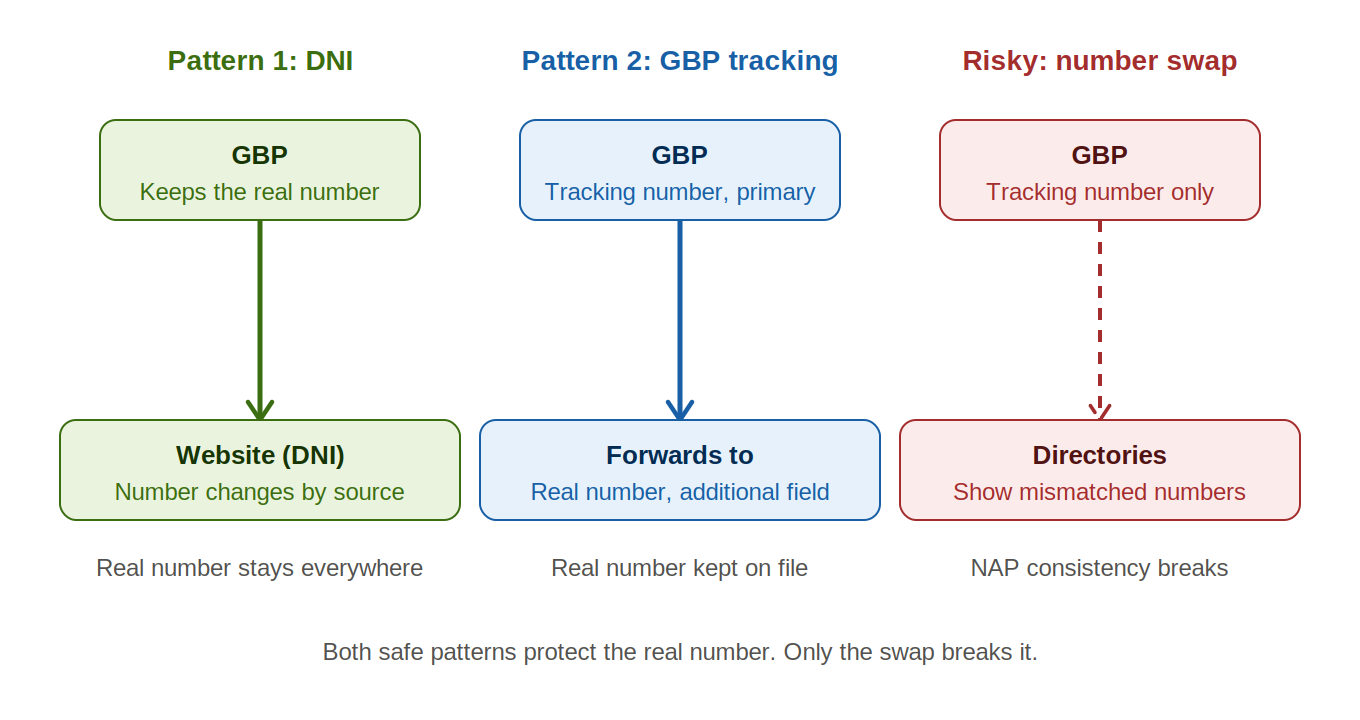
Pattern 1: Use DNI on the website and keep the real number on GBP
This is the lowest-risk setup.
We keep the real business phone number on Google Business Profile. We also keep that number on the contact page, location pages, website footer, LocalBusiness schema, and major citations.
Then we use dynamic number insertion on the website.
Dynamic number insertion, or DNI, changes the phone number shown on the site based on how the visitor arrived. For example, someone who clicks from Google Business Profile can see a tracking number tied to GBP traffic. A paid search visitor can see a different number. A direct visitor can see the default business number.
CallTrackingMetrics describes DNI as a way to swap website phone numbers based on the visitor source. See the guide to dynamic number insertion.
This setup works well for DNI call tracking and local SEO because it separates two jobs.
Google Business Profile keeps a stable business number.
The website handles attribution.
To make this work, add UTM parameters to the website link in Google Business Profile so your call-tracking platform can identify visitors who arrived from GBP.
Then configure the call-tracking tool to show a GBP-specific number only when that traffic source is present.
This is a strong option when we need to prove how many website calls came from GBP clicks. It also works well for multi-location brands because each location can keep its real local number on GBP while the website handles source-level tracking.
Pattern 2: Use a dedicated GBP tracking number that uses call forwarding to your real line
The second pattern tracks calls directly from Google Business Profile.
In this setup, we add a dedicated GBP call tracking number as the primary phone number. Then we keep the real business number as an additional phone number.
Whitespark has covered this setup in its local SEO guidance. The key point is that the real business number should remain attached to the profile as an additional number. See Whitespark’s article, Can you use a call tracking number in Google My Business?.
This setup can work when we need to measure calls placed directly from Search or Maps.
But it needs discipline.
The tracking number should:
- Forward to the real business line.
- Be unique to that location.
- Stay under business or authorized agency control.
- Avoid being reused for another business later.
- Keep the real number attached as an additional number.
This is important because call tracking affects more than reporting. It affects customer access.
If the tracking number breaks, customers may stop reaching the business. If the number changes vendors, old listings may still show it. If the number gets reused, calls can go to the wrong place.
Use this pattern only when direct Google Business Profile call attribution is worth the added cleanup and monitoring.
The pattern that gets you suspended
The risky pattern is simple.
A marketer replaces the GBP number with a tracking number. They do not add the real number as an additional number. Then that tracking number spreads across the web.
Now the business has conflicting phone data.
Google shows one number. The website shows another. Yelp, Apple Business Connect, Bing Places, Facebook, and other citations may show something else.
That creates NAP inconsistency from call tracking.
It also makes future cleanup harder. A temporary tracking number can end up in old directories, local data sources, campaign pages, and cached listings. If that number later gets disconnected or assigned to someone else, the business can lose calls.
The worst version is a shared tracking number.
For example, an agency uses one number pool for several home services clients. One number is used for one location, then later reused for another. Or a number appears on public listings for more than one business.
Do not do this.
Do not use one tracking number across multiple locations.
Do not replace the real business number everywhere.
Do not let a temporary campaign number become the business’s permanent citation data.
The rule is simple: track the call, but protect the business record.
How to validate NAP consistency after install
Call tracking should not go live without a quality check.
Use this process before sending reports to a client or leadership team.
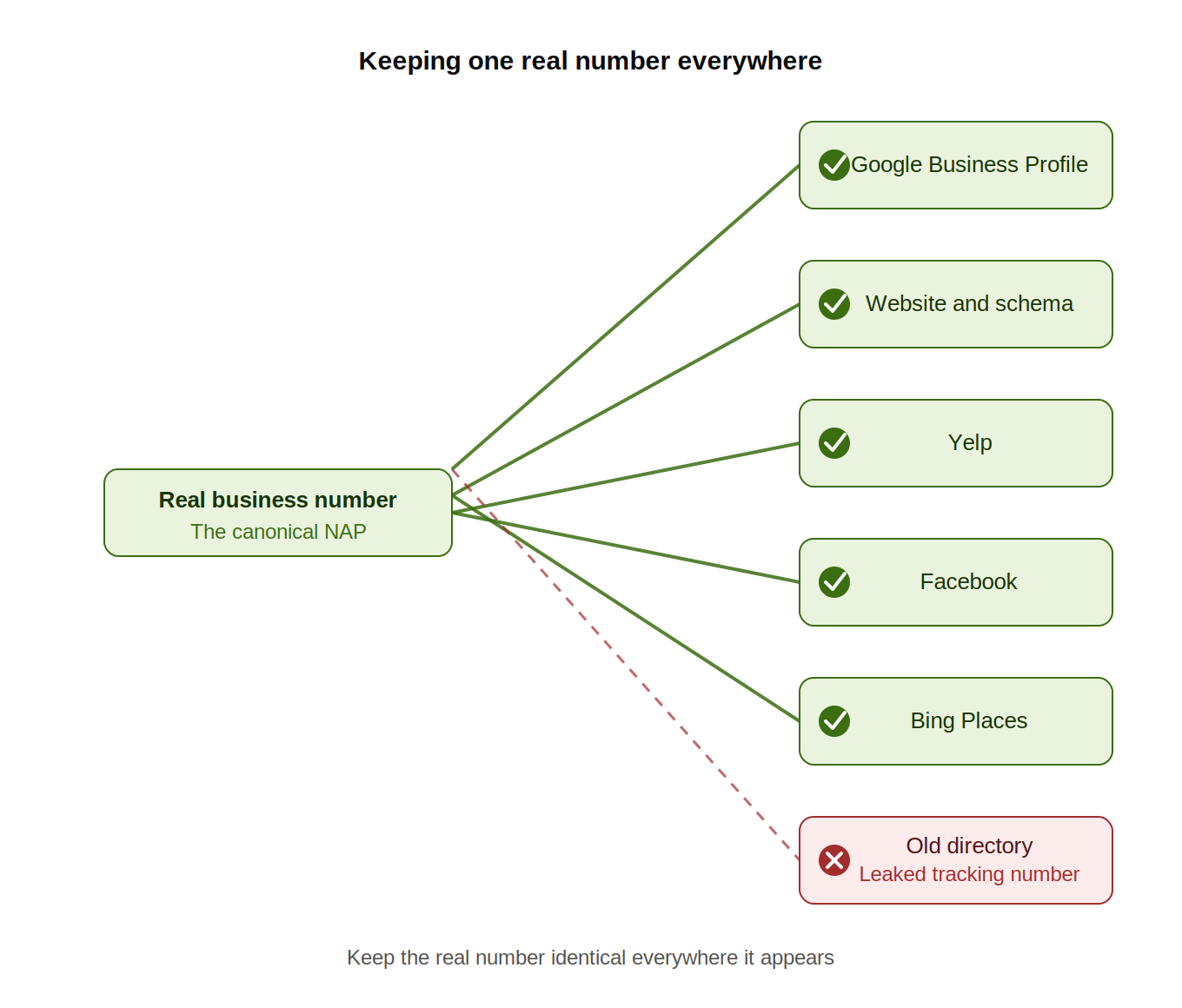
1. Record the canonical NAP
Start with the source of truth.
Write down the exact business name, address, and real phone number. Use the same format that appears on the website, Google Business Profile, and top citations.
This is the canonical NAP.
2. Check the Google Business Profile
If we use DNI only, the real number should stay as the primary GBP number.
If we use a dedicated GBP tracking number, the tracking number can be primary, but the real business number should be listed as an additional number.
Then place a test call from Search or Maps. Confirm that the call reaches the correct business line.
3. Check the website
The real number should still appear in the core business information.
Check the footer, contact page, location pages, and LocalBusiness schema.
If DNI is installed, test it by source. A GBP visitor should see the GBP website tracking number. A direct visitor should not be counted as a GBP visitor.
This protects both local SEO and attribution accuracy.
4. Search for tracking number leakage
Search Google for the tracking number in quotes.
Then search for the real phone number in quotes.
The real number should appear across normal citations. The tracking number should not appear in random directories unless that was intentional.
5. Audit the top citations
Check the major local platforms manually.
Review Apple Business Connect, Bing Places, Yelp, Facebook, BBB, industry directories, and key local directories.
For multi-location brands, start with a sample of locations. Then scale the audit across the rest.
6. Test reporting
Place test calls from each path:
- GBP call button.
- GBP website click.
- Organic website visit not tied to GBP.
- Paid search visit, if campaigns are active.
Each call should land in the correct source bucket.
Google’s Business Profile performance reporting includes interactions such as calls and website clicks. See Google’s Business Profile performance documentation.
But GBP reporting does not replace call-level attribution. It will not always tell us which calls were qualified, which became customers, or which drove revenue.
Google also ended Business Profile chat and call history on July 31, 2024. See Google’s notice on changes to Business Profile chat and call history.
For marketers proving SEO ROI, that makes third-party call tracking is more useful. We need source data, call quality, lead outcomes, and revenue context.
Recommended tools
Most teams should use a mature call-tracking platform rather than building this manually.
The right tool depends on the reporting need, sales process, and number of locations.
Common options include:
- CallRail: Useful for basic call tracking, recordings, and channel reporting.
- WhatConverts: Useful when we need to connect calls with lead quality and customer outcomes.
- CallTrackingMetrics: Useful when teams need more advanced routing, DNI, and call operations.
The tool matters less than the setup.
A strong platform can still create local SEO problems if the tracking number is added in the wrong place. A simple setup can work well if the real number stays consistent and the tracking number is controlled.
Before choosing a tool, confirm that it supports:
- DNI for website attribution.
- Location-specific tracking numbers.
- Call forwarding to the real business line.
- Clear ownership or transfer options.
- Reporting by source, campaign, and location.
- Easy testing before launch.
Conclusion
We do not need to choose between call attribution and local SEO safety.
We can track calls from Google Business Profile. We just need to keep the business identity stable while doing it.
For the lowest-risk setup, keep the real number on GBP and use DNI on the website.
For direct GBP call tracking, use a dedicated forwarding number as the primary number and keep the real number as an additional number.
Then, validate NAP consistency after launch.
That is how we prove SEO ROI without creating a local SEO cleanup project later.
If we manage local SEO for one location or many, the next step is to audit the current phone number setup, check for tracking number leakage, and standardize the rules before the next reporting cycle.
Sources
- Google Business Profile Help, “Use a different number on your Business Profile.”
- Google Business Profile Help, “Guidelines for representing your business on Google.”
- Google Business Profile Help, “Add your phone number.”
- Google Business Profile Help, “Business eligibility and ownership guidelines.”
- Google Business Profile Help, “Understand your Business Profile performance & insights.”
- Google Business Profile Help, “Changes to Google Business Profile chat and call history.”
- Whitespark, “Can You Use a Call Tracking Number in Google My Business?”
- Whitespark Blog
- CallTrackingMetrics, “How Does Dynamic Number Insertion Work?”

Paul Warren is the co-founder and Head of SEO at the Local Agency and has over 15 years of enterprise SEO experience.