
Google Removed the Call Button on Some Listings. Here’s How to Recover Bookings without It
If the call button disappeared from your Google Business Profile, your listing may not be broken. Google is changing how some local results appear, especially on mobile. The right move is to confirm what customers see, then give them another fast way to call, book, or request service.
TL;DR
- A missing call button is not always a listing problem. It can be a Google layout change.
- Test before you fix. Check mobile, desktop, Maps, branded searches, and non-branded searches.
- Recover bookings with backup paths. Use a mobile call bar, Google Posts, booking pages, and Local Services Ads when the search intent is urgent.
What changed in late 2025
For years, many local businesses had a simple path from Google to a booked job. A customer searched for a service. Google showed a local pack. The customer tapped the call button. The business got the lead. That path is no longer as dependable.
In its Q4 2025 local search coverage, Whitespark documented cases where call buttons were missing from some organic Google Business Profile results while sponsored placements still had stronger call options. That is the issue behind many searches for “GBP call button removed”, “Google Business Profile no call button”, and “missing call button GBP”.
The important point is simple: this is not always caused by a mistake in your listing.
Sometimes the phone number is still correct. The profile is still verified. The business is still ranking. But Google changes the layout, and the call button is no longer shown in the same place.
Sterling Sky also covered this shift in its State of Local SEO in 2026. Its “Less Call Buttons” section connects fewer call actions to newer local result formats, including AI local packs and layouts where images replace buttons. It also reported that 88% of 322 markets had fewer unique businesses in AI local packs than traditional local packs.
For owners, this creates a real business problem. Calls may drop even when rankings look stable. The demand may still be there, but the path from search to call is weaker. That is why we should treat this as a booking path problem, not just a GBP problem. If the profile is wrong, we simply fix the profile. If Google removed the call button from the search result, we need another way to capture the same customer.
How to confirm the button was actually removed
Do not make changes based on one screenshot. Google results can change by device, location, search history, keyword, and ad load. One person may see the call button while another does not. We need to confirm what is happening before we decide how to respond.
Test on mobile first
Most call button issues show up on mobile. That is where customers are most likely to tap and call right away.
Search for your main service and city. Then search for a nearby neighborhood. Then search for your business name.
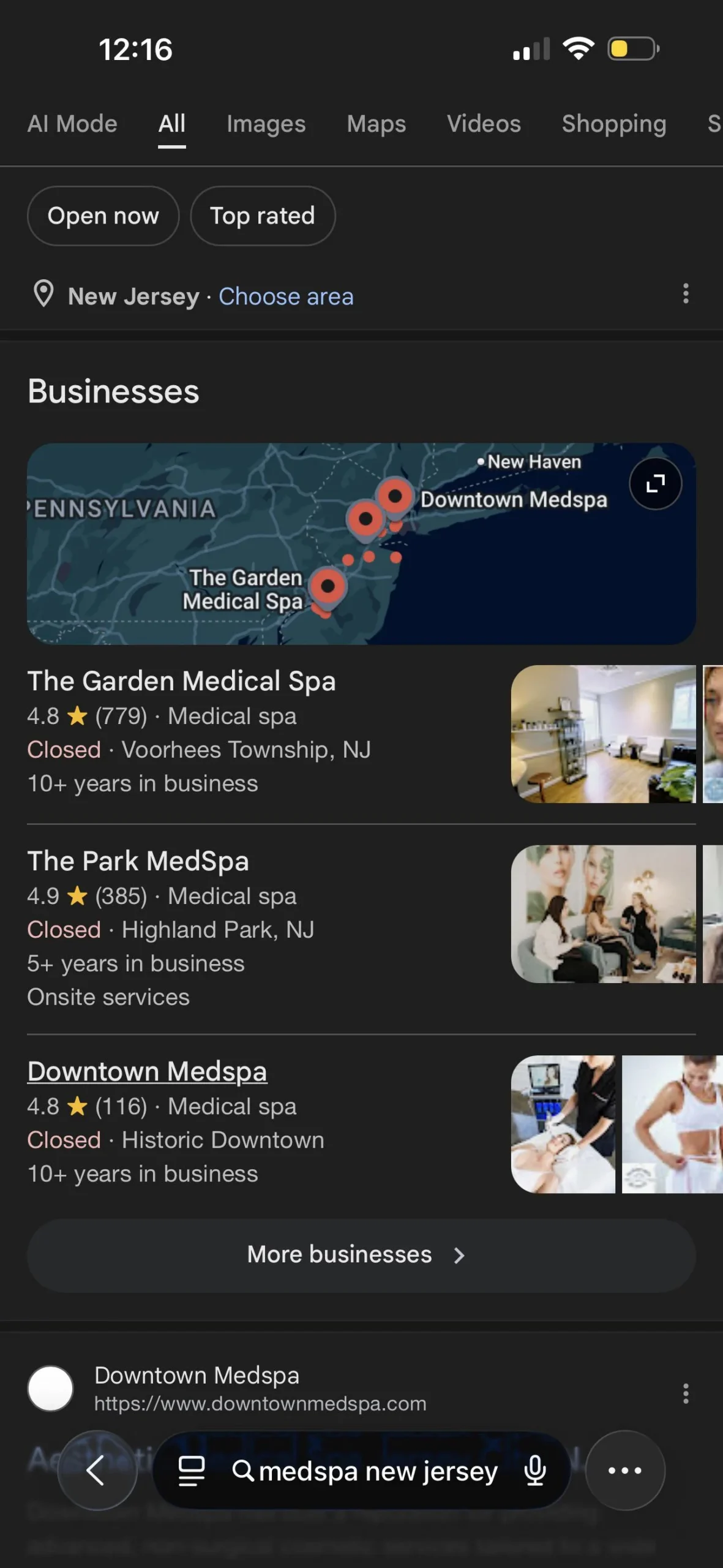
Check these three places:
- The local pack
- The full Google Business Profile
- Google Maps
If the call button is gone from the local pack but still appears inside the full profile, your listing may be fine. The issue is likely the search layout.
If the call button is gone everywhere, then we need to inspect the profile itself. Check the phone number, categories, verification status, business hours, and any recent profile changes.
Test while logged out
Run the same searches in a private browser window.
Then try another phone if you can.
A Google Business Profile no-call button issue can be personalized. It may appear for one searcher but not another. We want to know if the issue is broad enough to affect real customers.
Test from more than one location
Local results change based on where the searcher is standing. Ask a team member, dispatcher, tech, or trusted customer in your service area to run the same searches. Have them send screenshots.
For a service-area business, test from the center of the service area and near its edge. For a storefront, test near the location and a few miles away.
Compare branded and non-branded searches
A branded search is a search for your company name.
A non-branded search is a service search, such as:
- garage door repair near me
- emergency plumber in Dallas
- roof repair Austin
- towing near me.
- pest control same day.
If the call button appears on branded searches but not on non-branded searches, your profile may not be the problem. Google may be showing fewer direct call actions in competitive local results. That changes the fix. We may not be able to force every Google result to show the old call button. But we can make sure customers still have a clear way to contact you.
Three workarounds that recover bookings.
The goal is not to chase every Google test. The goal is to replace the lost tap. If the GBP call button is gone, we need other fast actions near the customer’s search.
1. Add a sticky mobile call bar on your website
If Google sends more users to your website, your website has to work harder. A sticky mobile call bar is one of the simplest fixes. This is a fixed bar at the bottom of the mobile screen. It stays visible as the visitor scrolls. It gives the customer a clear tap-to-call option at all times.
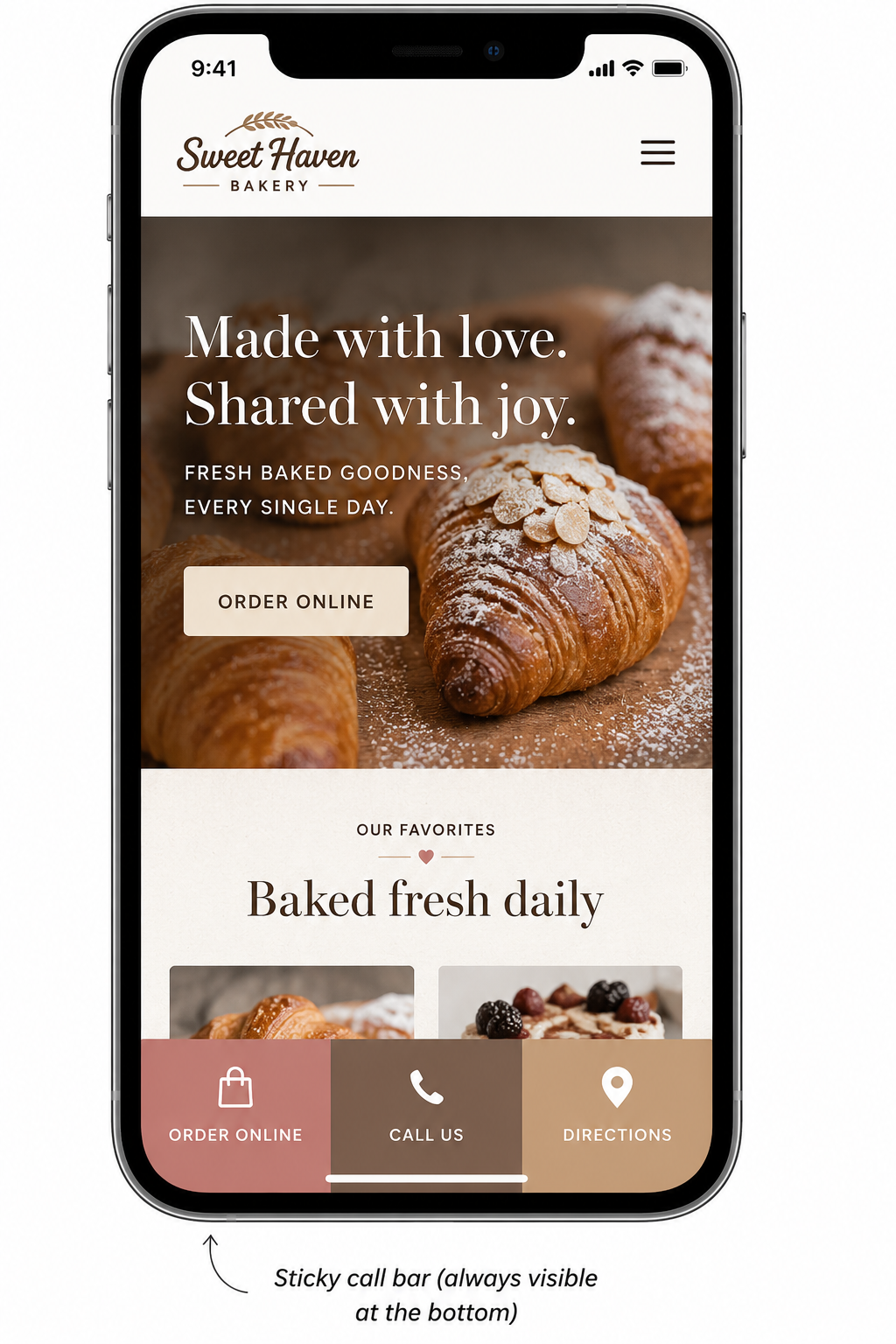
For many local businesses, this is the closest replacement for a missing GBP call button. Keep it simple. Use one clear Call now button. Add a Book online button only if online booking is a real option. Do not crowd the bar with too many choices.
Use the sticky call bar on pages that are likely to receive local traffic:
- Homepage
- Main service pages
- Location pages
- Emergency service pages
- Quote request pages
Make the button text clear. A small phone icon is easy to miss. “Call now” is easier to understand. Ensure the phone link uses the proper telephone format. Mobile users should not have to copy and paste your number.
This is also where your website needs to carry more of the local conversion work. For more on turning local traffic into calls and bookings see Why Are My GBP Impressions Up but My Calls Down? A Diagnostic Walkthrough.
2. Use Google Posts CTA pointing to a high‑converting booking page.
Google Posts will not replace every lost call but they can give customers another visible action inside your profile. The key is where the post sends people.
Do not send high-intent traffic to a generic homepage. Send it to a focused booking page that matches the service. If the Post is about AC repair, send users to an AC repair page. If it is about roof inspections, send them to a roof inspection page. If it is about pest control, send them to a pest control booking page. The page should match the customer’s needs.
A strong booking page should include:
- A tap-to-call button near the top
- A short booking or quote form
- Clear service area language
- A simple response-time message
- Reviews or trust proof
- One obvious next step
Keep the form short. For many service businesses, name, phone number, service type, and preferred time are enough. The more fields you add, the more likely the customer is to leave.
Use tracking on your Google Post links if your website or marketing team already supports it. This helps show whether people are clicking from your Google Business Profile to your booking page. If tracking is not set up yet, do not let that stop you from using the Post. The priority is to give customers a clear path to call, book, or request service. That data matters in the monthly report.
If Google removes one direct action, we create another one.
3. Use LSA fallback for emergency / high‑intent queries
Local Services Ads are not the right answer for every business. They cost money. They need active management. They can waste budget if the categories are too broad. But they can help when lost call actions affect urgent, high-intent searches. This is most useful when the customer needs help soon and is likely to call the first business that looks trustworthy.
Examples include:
- Emergency plumber
- Garage door repair near me
- HVAC repair is open now
- Towing near me
- Locksmith near me
- Pest control same day
- Appliance repair near me
These customers are not usually doing deep research. They want a fast answer and a clear next step.
Start narrow.
Choose the services with the highest booking value. Limit the service area. Watch lead quality. Pause weak categories. Do not judge LSA only by lead count. Track booked jobs, cost per booked job, and revenue when possible. A lead is only useful if it turns into real work. To learn more about how to use paid fallback channels without letting spending get out of control check out our article How to Track Which Calls Came From Google Without Breaking Your Local SEO.
.
How to prove the recovery in your monthly report
Owners do not need a long explanation of every Google test. They need to know whether bookings came back. Add a simple section to the monthly report called call path recovery or GBP call button recovery. Then track the following lead sources: GBP calls, website
GBP calls
Start with Google Business Profile call trends. Show calls from GBP month over month. Add a short note if screenshots show fewer call buttons in the local pack. Do not treat GBP calls as the whole story. If Google changes where the call happens, bookings may recover through the website, Google Posts, or ads, while GBP call clicks stay lower.
Website click-to-click events
Track every mobile phone click on the website. This includes the sticky call bar, header phone links, service page buttons, and location page buttons. If the sticky call bar is working, mobile click-to-call events should rise. Show the top pages that created those calls.
Booking page conversions
Track form fills, booking clicks, and appointment requests from the Google Post landing pages. Use tracking links when available to separate this traffic from other Google traffic. This helps answer the real question: Did we replace lost call actions with new booking actions?
LSA booked jobs
For Local Services Ads, report booked jobs instead of only leads. Lead count can look good while job quality is poor. Booked jobs are more useful. Track cost per booked job. Track revenue when the data is available.
The report should tell a clear story:
- Google changed the call path.
- We confirmed the change with testing.
- We added new call and booking paths.
- We measured whether total bookings recovered.
That is the outcome owners care about.
Conclusion
When the GBP call button is removed, it can feel like something is wrong with your listing. Sometimes there is a listing issue. Often, there is not.
Google is changing local search layouts. Some results show fewer direct call actions. Some push users toward ads, images, AI local packs, or deeper profile clicks.
We cannot control every Google test. But we can control the next step.
We can make the website easier to call from. We can use Google Posts to send ready customers to focused booking pages. We can use Local Services Ads as a fallback for urgent searches. Then we can prove the recovery in the monthly report.
If your GBP call button is gone and bookings are slipping, we can help rebuild the path from local search to booked job.
Sources
- Whitespark, “17 Local Developments You Need to Know About from Q4 2025”
- Sterling Sky, “The State of Local SEO in 2026”

Paul Warren is the co-founder and Head of SEO at the Local Agency and has over 15 years of enterprise SEO experience.