
Why Your GBP Insights Numbers Don’t Add Up — and What to Trust Instead
If your Google Business Profile numbers look wrong this month, you are not imagining it.
There is a real reporting issue affecting GBP performance data. In Q3 2025, Whitespark reported an unresolved GBP impressions reporting bug that caused sudden drops in reported search impressions inside the Performance section of Google Business Profiles. The issue appeared to be a reporting bug, not a confirmed visibility loss.
That means we should be careful. We should not make strategy decisions based on one broken number.
TL;DR
- GBP Insights can be wrong. A sudden drop in impressions may be a reporting issue, not a real business problem.
- Use more than one data source. Compare GBP Performance with GA4, Search Console, and call tracking before concluding.
- Trust trends more than single metrics. We want to see whether clicks, calls, bookings, and leads changed together.
What the bug is
The issue is simple to describe but frustrating to diagnose.
At the end of June 2025, multiple Local Search Forum members reported sudden drops in GBP search impressions. Whitespark covered this in its Q3 2025 local search roundup and noted that the issue remained unresolved at the time of publication. The report also said the problem appeared to be a bug rather than part of normal search volatility from Google’s June core update.
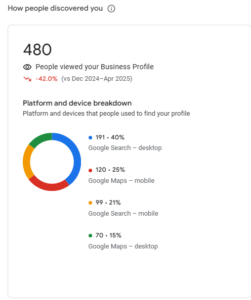
For business owners, this creates a common problem.
The monthly export shows fewer impressions. The owner worries that fewer people are finding the business. The team may then assume rankings dropped, the profile was penalized, or competitors overtook them.
That may be true in some cases. But it is not safe to assume.
A GBP insights bug can make performance look worse than it is. The profile may still be ranking. Customers may still be clicking. Calls may still be coming in. But the impression count may not reflect the full picture.
This is why we should not treat GBP impressions as the only source of truth.
Whitespark also reported that chat clicks appeared in the New Merchant Experience Performance tab as of June 2025. That matters because GBP reporting is changing, and new or updated metrics can create confusion when teams compare one month to another.
When the reporting system changes, the trend line may look strange even if customer behavior has not changed much.
How to triangulate using GA4, Search Console, and call tracking
When GBP numbers do not add up, we compare them against other signals.
We are not looking for one perfect report. We are looking for agreement across several reports.
Start with GBP Performance, but do not stop there
GBP Performance still has value. It can show how people interact with the Business Profile through calls, website clicks, direction requests, bookings, messages, and other actions.
But if impressions suddenly drop while actions stay steady, we should pause before calling it a real visibility problem.
A true visibility drop usually affects more than one metric. We would expect to see fewer profile actions, fewer website visits, fewer calls, or weaker rankings at the same time.
If only impressions fall, the reporting bug becomes a stronger possibility.
Check GA4 for local landing page traffic
Next, we check GA4.
We look at organic traffic to the homepage and key local landing pages. We compare the same data range month over month and year over year when possible.
If GBP impressions dropped but organic sessions stayed steady, the issue may be reporting-related. If both impressions and local landing page traffic dropped, the problem may be real.
We also look at conversions. A smaller traffic dip matters less if calls, forms, bookings, or purchases are stable. A small reporting change should not outweigh actual lead behavior.
Check Search Console for search visibility
Search Console helps us see whether Google Search traffic changed outside GBP Performance.
We look at clicks, impressions, average position, and top queries. We pay close attention to branded searches, service searches, and location-based searches.
If Search Console impressions are steady while GBP impressions are down, that points back to a possible Google Business Profile reporting bug.
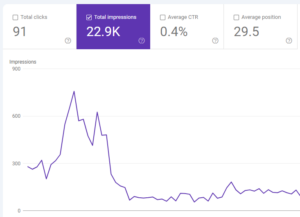
If Search Console and GBP both show a drop, we take the issue more seriously.
The goal is not to match the numbers exactly. They are different tools with different reporting methods. The goal is to see whether the direction matches.
Check call tracking for real lead impact
Call tracking is often the clearest signal for owners.
If GBP impressions look wrong but calls are steady, we should not panic. If calls drop at the same time, we investigate more deeply.
We compare call volume, answered calls, missed calls, and first-time callers, and call source. We also check whether tracking numbers, forwarding numbers, or call extensions have changed.
A reporting bug can make a chart look bad. A real call drop affects revenue.
That is why calls should be part of the monthly review, not an afterthought.
A monthly dashboard template you can copy
The best dashboard is simple. It should help us answer one question:
Did visibility, traffic, and leads move in the same direction?
If the answer is yes, the trend is more likely real. If the answer is no, we investigate the reporting source before changing strategy.
Here is a clean monthly dashboard structure.
1. GBP Performance summary
Start with the core GBP metrics.
Include profile impressions, website clicks, calls, direction requests, bookings, messages, and chat clicks if available in the NMX Performance report.
Then add a short note under the table:
Context to include:
Did impressions move differently from actions? Did calls or clicks stay steady despite an impression drop? Were any new reporting fields added this month?
This note matters because it keeps the dashboard from becoming a pile of numbers.
2. GA4 local traffic summary
Next, add GA4 traffic for the pages that matter most.
This usually includes the homepage, location pages, service pages, and contact page. We should include sessions, engaged sessions, conversions, and conversion rate.
The key is not just traffic. It is traffic quality.
If sessions are flat but conversions are up, performance may be improving. If sessions are up but leads are down, we need to look at the quality of that traffic.
3. Search Console visibility summary
Then add Search Console data.
Focus on clicks, impressions, average position, and top queries. Separate branded queries from non-branded local queries when possible.
This makes the report easier to read.
A branded search drop may mean fewer people are looking for the business by name. A non-branded drop may point to a local SEO visibility issue. Those are different problems.
4. Call tracking and lead summary
Finally, add the business outcome metrics.
This section should show calls, forms, bookings, chats, missed calls, and qualified leads. If the business tracks revenue or appointment value, include that too.
This is the part owners usually care about most.
If GBP impressions are down but calls and leads are steady, we should explain that the reported visibility drop may not reflect a real business decline. If impressions, clicks, calls, and leads all dropped together, we should treat it as a real performance issue.
Simple dashboard layout
Use this format each month:
| Section | Metric | What we check |
| GBP
Performance |
Impressions, clicks, calls, directions | Did profile actions match the impression trend? |
| GA4 | Organic sessions and conversions | Did website traffic and leads change? |
| Search
Console |
Clicks, impressions, queries | Did search visibility move in the same direction? |
| Call tracking | Calls, missed calls, qualified calls | Did real lead volume change? |
| Notes | Edits, bugs, seasonality, campaigns | What context explains the data? |
This table is not meant to replace analysis. It gives us a repeatable way to spot mismatches.
The notes section is important. That is where we record profile edits, website changes, holidays, seasonality, ad campaigns, tracking updates, and known reporting issues.
Without notes, every month looks like a mystery.
Conclusion
GBP Performance reports are useful, but they are not perfect.
Because Whitespark documented an unresolved GBP impressions reporting bug in Q3 2025, we should be careful when monthly exports show sudden impression drops. Whitespark
We should not ignore the data. We should also not overreact to it.
The better approach is to triangulate.
Compare GBP Performance with GA4, Search Console, and call tracking. Look for patterns across visibility, traffic, and leads. If several sources show the same decline, we investigate the business problem. If only one metric looks wrong, we investigate the reporting problem first.
Monthly reporting should help us make better decisions, not create panic.
If your GBP impressions look wrong, we can review your NMX Performance report, compare it with your website and call data, and show which numbers are reliable enough to guide the next move.
Sources
Whitespark, “18 local developments you need to know about from Q3 2025.”

Paul Warren is the co-founder and Head of SEO at the Local Agency and has over 15 years of enterprise SEO experience.