
Do You Really Need LocalBusiness or Industry-Specific Schema on Your Website?
For a single-location business, structured data is one of the simplest technical SEO improvements we can make in an afternoon. The right industry-specific schema helps search engines understand the business name, address, phone number, hours, service area, and business type without guessing.
TL;DR
- Start with the LocalBusiness schema for any single-location business.
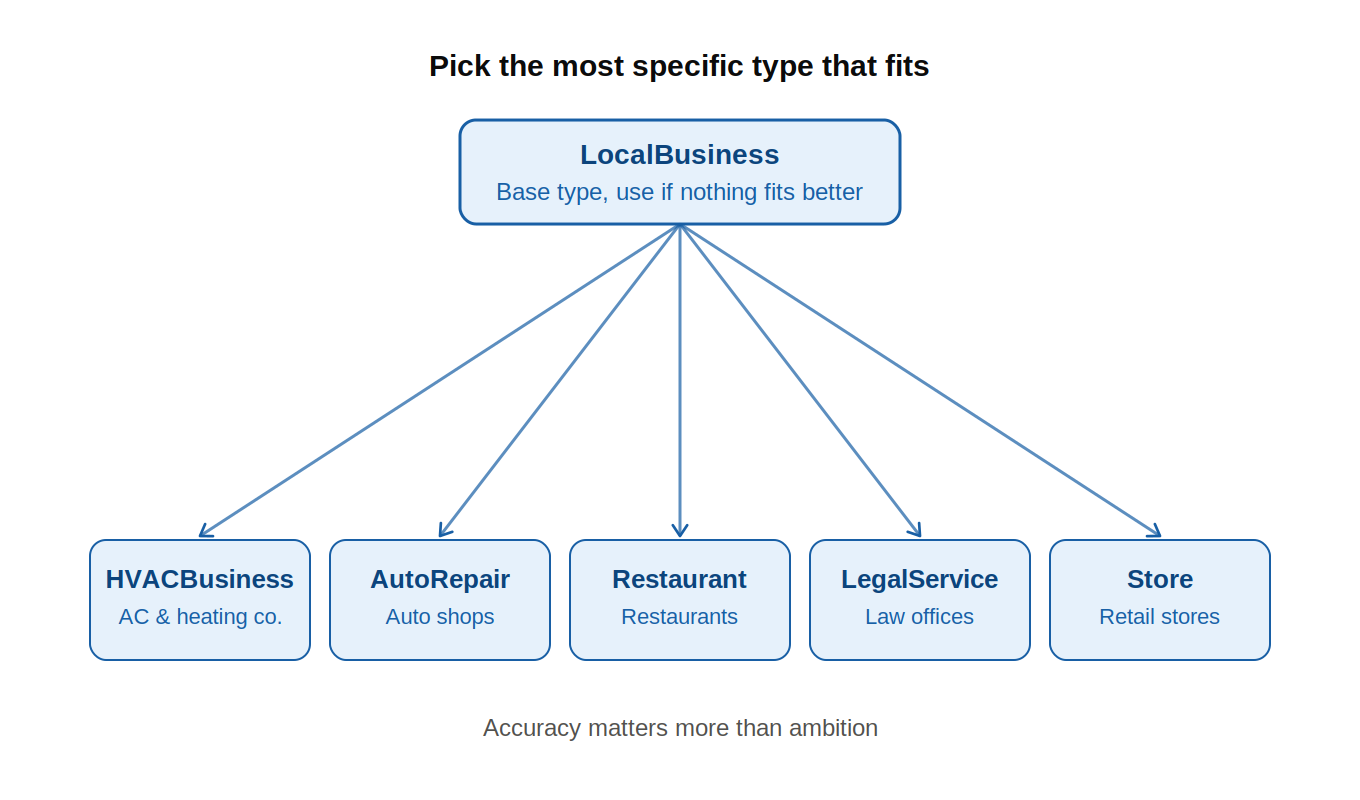
- Use a more specific type when it fits, such as HVACBusiness, AutoRepair, Restaurant, Store, or LegalService.
- Gather the right business details first, then have a developer validate the schema in Google’s Rich Results Test and the Schema.org validator before publishing.
What LocalBusiness and industry-specific schema does for your listing in search.
Google’s Local Business structured data documentation explains that local business markup helps Google understand key details about a business, including its name, address, hours, reviews, departments, and location data.
That does not mean schema guarantees higher rankings.
It also does not mean Google will always show a rich result.
It means we are giving search engines a clean, machine-readable version of the facts already shown on the page.
The base type is LocalBusiness. Schema.org describes LocalBusiness as a physical business or branch of an organization. That covers a lot of companies.
A restaurant is a local business.
An auto repair shop is a local business.
A law office is a local business.
An HVAC company is a local business.
But those businesses are not the same. That is where industry-specific schema helps.
When Schema.org has a more specific type that matches the business, we should use it. For example, HVACBusiness is more precise for a heating and air conditioning company than plain LocalBusiness.
The practical rule is simple:
- Use LocalBusiness when there is no better fit.
- Use an industry-specific type when one clearly matches the business.
- Do not force a type just because it sounds better for SEO.
Accuracy matters more than ambition.
Properties Google actually consumes vs. ones it ignores.
Google lists name and address as required properties for Local Business structured data. It also recommends fields such as location coordinates, hours, phone number, URL, price range, departments, reviews, and ratings.
That does not mean every possible field deserves attention.
For a single-location business, we should focus on fields that describe the real-world company clearly.
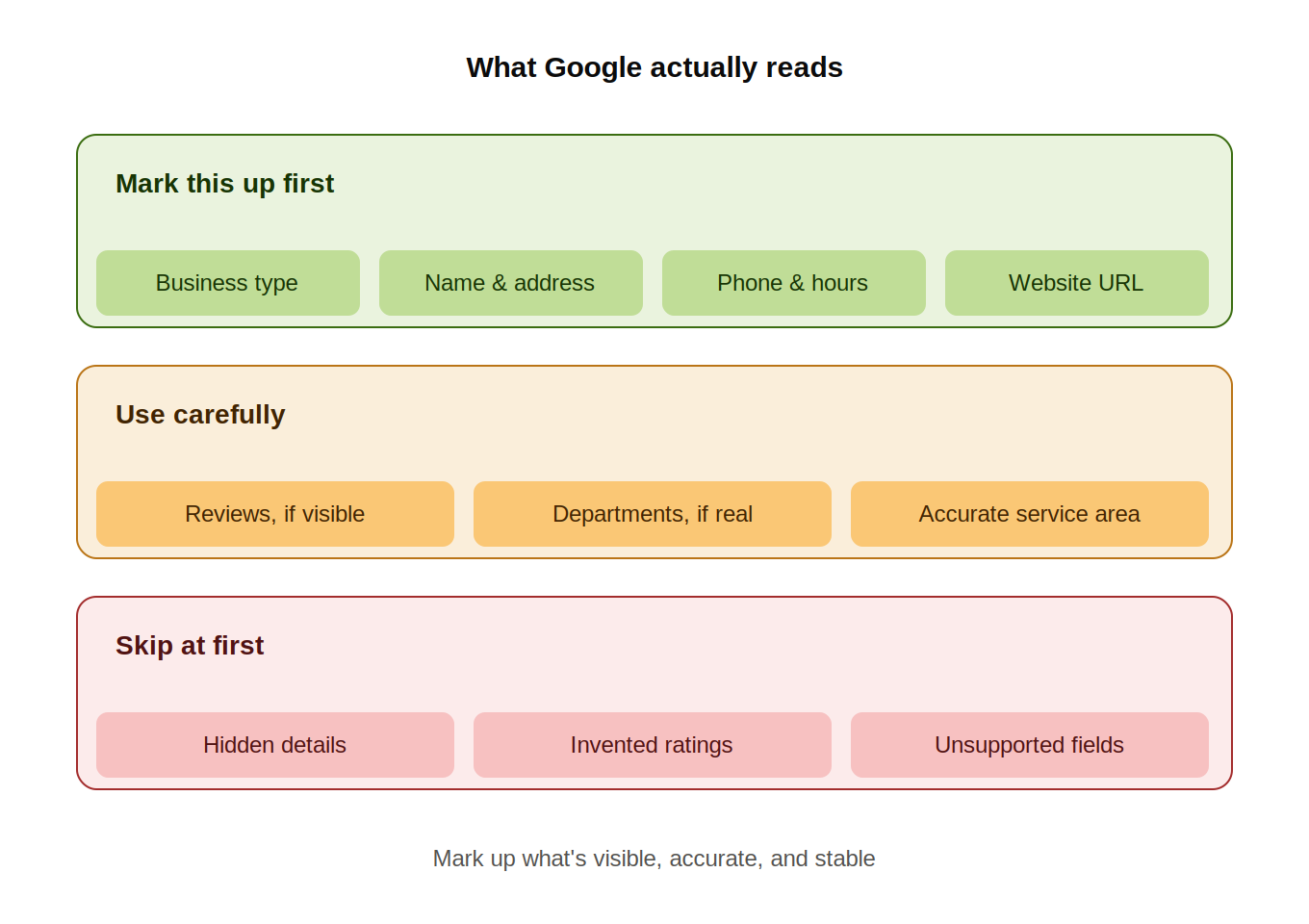
Highest-priority details
- Business type
- Business name
- Address
- Main phone number
- Website URL
- Opening hours
- Main image
- Price range, if appropriate
- Main service area
- Official social profiles, if useful
These details define the business, location, and customer-facing experience.
They are also the details users expect to find on a local business page.
Details to use carefully
Use reviews and ratings only when the page displays real review content that follows Google’s guidelines.
Do not invent ratings.
Do not mark up ratings that users cannot see.
Do not copy reviews from third-party platforms unless the page is allowed to display and mark up that content.
Use departments only if the business has real departments with separate names, hours, phone numbers, or URLs. Most single-location businesses do not need this.
Use the service area carefully. It should describe where the business actually works. It should not become a long list of nearby cities for keyword coverage.
Use social profiles only when they help confirm the business identity. Focus on the profiles the business owns or controls.
Details to skip at first
Schema.org includes many valid properties that Google does not list as supported for Local Business rich results.
That does not make those properties wrong.
It just means they should not be the priority.
Our rule is simple: mark up facts that are visible, accurate, stable, and useful to customers.
If a detail is hidden, outdated, vague, or promotional, leave it out.
How to validate with Rich Results Test and Schema.org validator.
After a developer implements the schema, test it before publishing or soon after launch.
Use Google’s Rich Results Test first. Test the live URL if the page is public. If the page is still in staging, the developer can test the structured data before launch.
The Rich Results Test shows whether Google can read the structured data for supported search features. It can also surface errors and warnings.
Next, use the Schema.org validator. This checks whether the markup follows the broader Schema.org structure.
These tools answer different questions.
The Rich Results Test asks: “Can Google use this for supported search features?”
The Schema.org validator asks: “Is this valid structured data?”
Use both.
After publishing, inspect the live URL in Google Search Console. This helps confirm that Google can crawl and process the page.
Service and FAQ add-ons
The base industry-specific schema belongs on the homepage or main location page.
Service pages can go deeper.
For example, an HVAC company may have separate pages for:
- AC repair
- Furnace installation
- Heat pump maintenance
- Indoor air quality
- Emergency HVAC service
Each page can use Service markup when the page is clearly about one service.
The writer’s job is to make the service page clear enough to support that markup.
That means the page should include:
- A clear service name
- A plain-language service description
- The business providing the service
- The main service area
- Useful details about what customers can expect
- Internal links to related service pages
The schema should reflect what the page already says.
It should not add claims that are missing from the visible content.
FAQ sections can also help when they answer real customer questions. Use the FAQPage only when the page includes visible questions and answers.
Do not add FAQ schema for questions that are not on the page.
Do not use FAQ content to stuff keywords.
Good FAQ content should reduce confusion and help customers take the next step.
For a more service-page structure, link to the related service pages. For the broader local SEO setup, see Article 4. For the next step in schema implementation, see Article 25.
Common mistakes that make Google ignore your schema.
The most common mistake is mismatched information.
If the page says “Suite 200” and the schema says “Suite 210,” fix it.
If the phone number in the footer is different from the schema, fix it.
If the business changed hours last month, update the schema.
Another common mistake is marking up content that users cannot see. The schema should describe the page. It should not hide claims from customers.
The business type also matters.
- A restaurant should not use HVACBusiness.
- An auto shop should not use a restaurant.
- A law office should not stay on a generic type if LegalService is the better fit.
Choose the closest accurate type, not the type that sounds most keyword-rich.
Review markup is another common problem. Do not invent ratings. Do not mark up ratings that are not visible. Do not copy third-party reviews into the schema unless the page is allowed to display and mark up that content.
Validation also matters.
Even if the writer does not create the schema, the page owner should still ask the developer to test it. One technical error can prevent search engines from reading the markup correctly.
Finally, make sure Google can access the page.
A valid schema setup will not help if the page is blocked by robots.txt, marked noindex, hidden behind a login, or rendered in a way search engines cannot process.
Conclusion
Yes, a single-location business should use LocalBusiness and industry-specific schema.
More specifically, it should use the most accurate Schema.org type available for the business.
For an HVAC company, that may be HVACBusiness.
For another company, it may be AutoRepair, Restaurant, Store, LegalService, or another valid subtype.
Writers do not need to create the schema themselves.
But we can still prepare the facts, check the page content, and give developers a clean implementation brief.
If we can make it easier for search engines to understand the business, it is worth doing.
Need help planning an industry-specific schema across a local business website? Start with our service pages or read Article 25 for the next technical step.
Sources
- Google Search Central, Local Business structured data:
- Google Rich Results Test:
- Schema.org, LocalBusiness:
- Schema.org, HVACBusiness
- Schema.org, Service:
- Schema.org, FAQPage:
- Schema.org Validator:

Paul Warren is the co-founder and Head of SEO at the Local Agency and has over 15 years of enterprise SEO experience.