
Why Are My GBP Impressions Up but My Calls Down? A Diagnostic Walkthrough
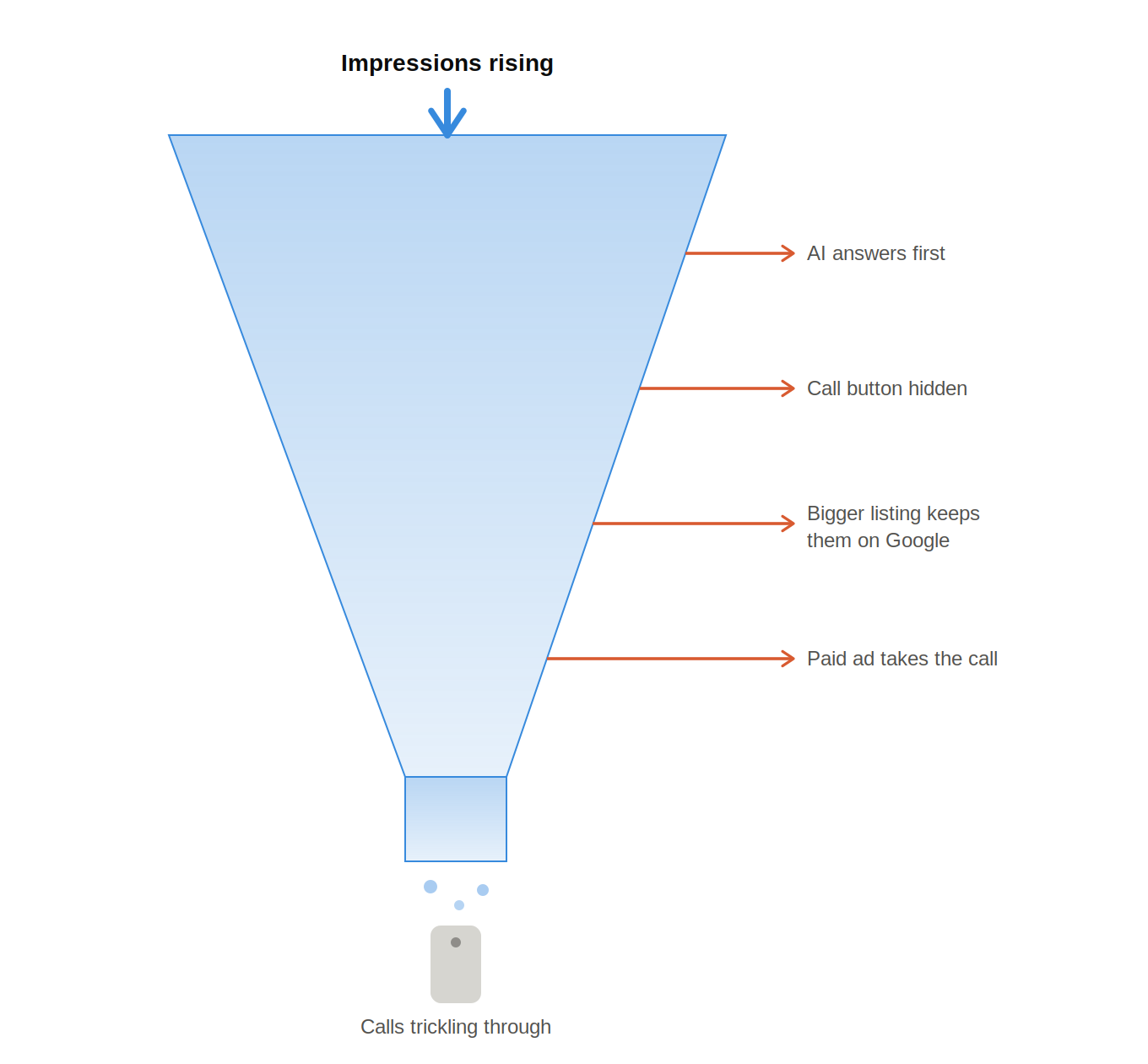
Your Google Business Profile report says more people are seeing you. But the phone is quieter. That feels wrong. It is also happening to many local practices in 2025-2026. The issue is usually not one problem. It is a change in how Google shows, answers, and routes local searches.
TL;DR
- Google changed the call path. In some local results, the call button may be less visible, moved, or missing from certain organic local listings.
- Searchers are getting answers before they call. AI Overviews and expanded local results can answer common questions directly on Google.
- Your listing may be getting more visibility from lower-intent searches. Category changes, layout changes, paid local placements, or broader discovery searches can raise impressions without increasing calls.
Cause 1: Google Quietly Removed the Call Button on Some Listings
If your Google Business Profile impressions are up but calls are down, start with the live search result. Do not start with the dashboard. Start with the phone.
In Q4 2025, Whitespark reported local search changes that included cases where call buttons were missing from some organic local listings. In some examples, paid or sponsored results still had stronger call options.
That matters because many customers do not copy and paste your phone number. They tap what Google gives them.
If the call button moves, shrinks, or disappears, calls can drop even when your visibility improves.
This creates the paradox. Your listing may show up more often. Your name may appear in more searches. Your impressions may look healthy. But fewer searchers may have a one-tap way to call your office.
Sterling Sky’s 2026 local SEO analysis also points to declining click-to-call activity from Google Business Profiles and connects the issue to changing local layouts, AI-powered local results, and paid local placements.
For local businesses, this can affect lead flow fast.
A customer looking for urgent help, a nearby provider, a quote, or a same-day solution may not dig around for your number. They simply choose the listing with the easiest action.
If your call button is less visible, the customer may tap another practice.
What to Check
Search your main terms on a mobile phone. Do this outside your office if possible.
Try searches like:
- “[your service] near me”
- “[your service] [city]”
- “Best [your service] near me.”
- “[high-intent service] near me”
- “[problem your customer has] near me”
Then look at the result like a customer.
- Is the call button visible?
- Is it behind another tap?
- Does a sponsored result above you have a call button?
- Does your organic listing show only website, directions, or other actions?
- Does your profile look complete, current, and easy to act on?
This is not a ranking check. It is a conversion-path check.
Cause 2: AI Overviews Are Answering the Caller’s Question Before They Call
The second cause is not the call button. It is the customer’s need.
Many calls used to happen because someone had a quick question.
- Do you serve my area?
- What service do you offer?
- How much does this usually cost?
- Are you open today?
- Can I get help quickly?
- Do you work with businesses like mine?
- What should I do next?
Now Google may answer part of that question before the person calls.
Semrush studied AI Overviews across millions of keywords and found that AI results have become a meaningful part of search behavior. Their research also shows that AI Overviews are not limited to simple informational searches. They can appear across different types of intent, including commercial and local decision-making searches.
That changes the call pattern.
Some people get enough information from Google and never click. Some click later. Some compare more practices before acting. Some move straight to booking. Some stop searching.
This does not mean every lost call was a lost customer. Some calls were low-intent information calls.
But it does mean the old rule is weaker. More impressions no longer guarantee more calls.
The important question is whether you lost low-value calls or high-value calls. That is the difference between a reporting concern and a business concern.
What to Check
Review call quality, not only call quantity. Pull a sample of calls from the last 60 days. Compare it with the same period before the drop.
Group the calls into four buckets:
- New client booking calls
- Existing client calls
- Insurance, pricing, or general questions
- Wrong numbers, spam, vendors, or low-intent calls
If total calls fell but new client bookings stayed stable, the business impact may be smaller than the report suggests.
If new client booking calls fell too, continue the audit.
Cause 3: Bigger GBP Layouts Mean Longer Dwell Time but Fewer Calls
Google Business Profiles are no longer simple listings. They are mini landing pages.
A searcher can see photos, reviews, services, hours, location details, posts, popular times, appointment links, and directions without leaving Google.
Whitespark’s Q3 2025 local search update covered larger and more detailed Google Business Profile experiences, including expanded layouts and more information shown inside the search result.
That can help impressions rise.
It can also reduce calls.
Why? Because people can make more decisions on the search page.
They can scan reviews. They can compare photos. They can check hours. They can look at your location. They can decide whether the office feels modern. They can decide whether you are close enough. They can decide whether another practice looks easier to contact.
This is why impressions can rise while calls fall.
Google gives your listing more surface area. But it also keeps the customer inside Google longer. That means your GBP has to do more than appear. It has to convert.
What to Check
Look at your profile like a new customer with 20 seconds to decide.
Ask:
- Do your first few photos build trust?
- Are your reviews recent and relevant?
- Does the review mention the services you want more of?
- Are your hours accurate?
- Is your website link going to the best mobile page?
- Are our services complete?
- Do your Google Posts give people a next step?
- Is there an obvious way to call, request a quote, book, or contact you?
A larger listing helps only if it makes the next action clear.
For many local businesses, the next action should not only be “call.”
It may also be:
- Request a quote
- Book online
- Get directions
- Visit a service page
- Submit a contact form
- Message the business
Cause 4: A Category Change May Have Shifted the Type of Searches You Appear For
A category change can also cause GBP calls to drop while impressions rise.
Your primary Google Business Profile category tells Google what kind of business you are. It affects the searches you appear for. It can also affect the competitors shown around you.
Sometimes the change is intentional. A business may change its primary category to focus on a more profitable service.
Sometimes the change is accidental.
A manager edits the profile.
A third-party tool syncs data.
Google suggests an update.
A team member accepts a change without knowing the impact.
The result can be confusing.
You may get more impressions from broader or less urgent searches. But calls may fall because those searches are less likely to turn into phone calls.
For example, a searcher looking for general information may compare several options before contacting anyone.
A searcher can create an impression. Both searches can create impressions. They do not create the same call behavior.
This is where we recommend reading Primary Category vs. Secondary Categories on Your Google Business Profile: What Google Doesn’t Tell You.
What to Check
Open your Google Business Profile and review:
- Primary category
- Secondary categories
- Services
- Appointment URL
- Business description
- Products or service menus, if used
Then compare the current setup with the version you had before calls dropped.
If you do not have a change log, check old screenshots, agency reports, SEO reports, or profile update emails.
The question is not only, “Did visibility increase?”
The better question is, “Did we start showing up for searches that produce fewer calls?”
Cause 5: Your Listing Was Pulled Into an LSA Test or Paid Local Push
Local Services Ads can also change where calls go.
Sterling Sky’s 2026 local SEO analysis notes that Local Services Ads and other paid local units have become a larger part of local search visibility. Their report also connects paid local expansion with shrinking organic click opportunities in some markets.
That matters because a call can move from one Google surface to another.
Your GBP may still get impressions. Your organic local ranking may still look fine. But if a paid unit appears above you with a stronger call prompt, the customer may call from the ad instead.
This can make the GBP report look worse than the full lead picture.
It can also hide a real problem.
If your paid channels are capturing the calls, total lead volume may be stable. If paid channels are not replacing the lost calls, you may have a true acquisition issue.
This is why we do not judge GBP in isolation.
What to Check
Search your core keywords on mobile and desktop.
Look for:
- Local Services Ads above the map pack
- Google Ads above the local results
- Sponsored local results inside or near the pack
- Organic listings with weaker call options
- Competitors with stronger paid call prompts
Then compare:
- GBP calls
- Google Ads calls
- LSA calls
- Website calls
- Contact form submission
- Quote request
- Total new customer inquiries
The call may not have disappeared. It may have moved.
What This Looks Like in a Real Monthly GBP Report
A common report looks like this:
- GBP impressions are up 20–40%.
- Calls are down 10–30%.
- Website clicks are flat or slightly higher.
- Direction requests are steady or rising.
- Bookings may be unclear because they happen on a separate platform.
That pattern usually means demand has not disappeared. It means the contact path changed.
Here is another common pattern:
- GBP impressions are up.
- Calls are down.
- Website clicks are also down.
- Direction requests are down.
- Competitors are running LSAs.
- Your call button is harder to find.
That is more serious. It may mean Google is showing you more often in lower-intent searches, while high-intent callers are choosing another result.
A third pattern is also common:
- GBP impressions are up.
- Calls are down.
- Website clicks are up.
- Website forms are up.
- Quote requests are up.
That may not be a loss. It may be a channel shift.
This is why we do not treat “fewer calls from Google” as one diagnosis. We treat it as a symptom.
The right question is:
Where did the customer’s action go?
How to Confirm Which Cause Applies: A 30-Minute Audit
You do not need a full marketing audit to find the likely cause. You need 30 focused minutes and three reports.
Step 1: Check GBP Insights by Action Type
Open your Google Business Profile performance report and compare the last 30 days with the period before the drop.
Look at:
- Calls
- Website clicks
- Direction requests
- Messages, if enabled
- Booking clicks, if tracked
Then look for patterns.
- If impressions are up, calls are down, and website clicks are up, the call path may have shifted to the website.
- If impressions are up and all actions are down, the listing may be attracting less qualified searches.
- If calls are down but direction requests are up, more people may be deciding on Google without calling first.
- If branded searches are stable but discovery searches have changed, review categories, services, and ranking shifts.
Step 2: Review GA4 Channel and Landing Page Data
Open GA4 and compare the same date ranges.
Check:
- Organic Search traffic
- Paid Search traffic
- Direct traffic
- Referral traffic
- Mobile traffic
- Landing pages from Google organic
- Conversions from forms, booking links, and click-to-call buttons
This tells us whether demand moved from GBP calls to website actions.
If organic mobile traffic rose after GBP calls fell, your website has become more important as the conversion step.
That is not bad.
But it is only good if the website makes calling and booking easy.
Step 3: Compare CallRail or Call-Tracking Deltas
Open CallRail or your call-tracking platform.
Compare before and after the drop.
Check:
- Calls from GBP
- Calls from organic website traffic
- Calls from paid search
- Calls from LSAs
- First-time callers
- Missed calls
- Calls by hour
- Calls by landing page
- Booked calls, if you score calls
This is the most important part.
A drop in Google Business Profile calls is not always a drop in customers. But a drop in first-time callers from all Google sources is a real problem.
Also, check missed calls. If fewer calls are coming through, every missed call matters more.
What Not to Do When GBP Calls Drop: Tips
Tip 1: When the phone gets quiet, it is easy to overcorrect.
Tip 2: Do not make big profile changes without a baseline.
Tip 3: Do not change your primary GBP category just because impressions look strange. Category changes can shift the entire search mix. Make the change only after you review the before-and-after data.
Tip 4: Do not assume your rankings collapsed because calls dropped. In 2025–2026, calls can fall even when visibility is stable. The layout may have changed. The call button may be less visible. AI may be answering more questions. Paid local units may be taking more of the action.
Tip 5: Do not judge GBP alone. Look at website calls, forms, online bookings, LSAs, and paid search calls.
Tip 6: Do not remove tracking numbers without understanding attribution. Bad tracking can create confusion, but removing tracking too quickly can make the next month harder to diagnose.
Tip 7: Do not pause all paid visibility before checking whether calls moved into paid surfaces. If LSAs or local ads are now taking more call share, pausing them may reduce total leads.
Tip 8: Do not rewrite your whole website because one report looks bad. Start with the conversion path. Then adjust content, tracking, and local SEO.
The goal is not to react. The goal is to find the leak.
Three Things to Do This Month to Recover Bookings
You cannot control every Google layout, but you can control what happens after someone taps your website, booking link, post, or form.
1. Add a Sticky Mobile Call Bar on the Website
If Google sends more people to your website instead of the call button, your mobile site has to work harder.
Add a sticky mobile call bar that stays visible as the customer scrolls.
Keep it simple:
- Call
- Request a quote
- Directions
Do not hide the phone number in the footer.
Do not rely on a small header icon.
Do not make customers open a menu to contact you.
For service pages, use direct language near the button.
Sample Direct language:
- “Need help with your Google Business Profile? Talk to The Local Agency.”
- “Want more calls from local search? Request a Local SEO review.”
- “Not sure why your GBP calls dropped? Contact The Local Agency.”
2. Use the Online Booking Link as the CTA on Google Posts
Google Posts can still support conversions when the call path is weaker.
Whitespark’s Q3 2025 update noted changes to Google Posts, including a return to the “Posts” label and a more centralized post creation experience.
Use that space with purpose!
Do not post generic updates only.
Create posts that answer a decision question and lead to booking.
Examples:
- “GBP impressions up, but calls down? Request a Local SEO audit.”
- “Not getting enough calls from Google Maps? Contact The Local Agency.”
- “Want better Google Business Profile rankings? Let’s review your local visibility.”
- “Need more leads from local search? Get help from The Local Agency.”
Use your booking URL as the CTA when appropriate.
Add UTM tracking so GA4 can show whether those posts are producing visits and conversions.
3. Add a Contact Form Fallback With an Auto-Responder
Some customers will not call.
Some are at work. Some are comparing practices after hours. Some are not ready to speak with the front desk. Some just want to ask whether your office is a fit.
Give them a fallback.
Add a short contact form on key pages.
Ask only for what you need:
- Name
- Business name
- Website
- Phone
- Main issue
- Preferred time to be contacted
Then send an auto-responder that confirms receipt and sets expectations.
Example:
Thank you for contacting The Local Agency. We received your request and will review your Local SEO or Google Business Profile concern. Our team will follow up with the next step.
This helps recover leads when the call button is missing, when the customer is not ready to call, or when the search happens after hours.
Conclusion: Impressions Are Not the Problem. The Path to Contact Changed.
When your GBP impressions rise, and calls fall, do not panic.
The report is not saying your local SEO failed.
It is saying visibility and calls no longer move together the way they used to.
In 2025–2026, Google changed the local search experience. Some call buttons are less visible. AI answers more questions. Larger GBP layouts keep customers on Google. Paid local units take more space. Category changes can shift you into searches that do not call as often.
The fix is not to stare at impressions.
The fix is to audit the path from search to contact.
Check the live mobile result.
Review GBP actions. Compare GA4.
Look at CallRail.
Then improve every fallback path: mobile call bar, quote request CTA, Google Posts, contact forms, and tracked appointment links.
If the phone is not ringing, the demand may still be there.
You just need to make the next step obvious again.
Need help figuring out why your Google Business Profile impressions are up, but calls are down? Contact The Local Agency for a Local SEO and Google Business Profile audit
References:
- Sterling Sky: The State of Local SEO in 2026
- Whitespark: 17 Local Developments You Need to Know About from Q4 2025
- Whitespark: 18 Local Developments You Need to Know About from Q3 2025
- Semrush: Semrush Report: AI Overviews’ Impact on Search in 2025

Paul Warren is the co-founder and Head of SEO at the Local Agency and has over 15 years of enterprise SEO experience.